
The pieces agree until the cartons change.
The supplier repacks after the invoice is done, and the counts drift apart. Compare the packed cartons with the invoice lines, and fix the gap before the papers go out.
This free commercial invoice template and packing list is one Excel file for checking your China shipment papers before the goods leave. Download it, enter the invoice lines on one sheet and the cartons on the other. Four checks compare cartons, gross weight, net weight and pieces, and show MISMATCH when they differ.
The supplier repacks after the invoice is done, and the counts drift apart. Compare the packed cartons with the invoice lines, and fix the gap before the papers go out.
A short sales name can hide a different material or use. Customs cannot match it to an HTS code. Link each line to the same product and spec.
Net weight is the goods. Gross weight adds the packing, so it is always higher. State kg, and keep per-carton figures apart from shipment totals.
A commercial invoice is the seller’s bill for the goods in a shipment, and customs uses it to assess the entry. This commercial invoice template lists the seller and buyer, the goods, quantities, prices, currency, origin and trade term, all matching the real goods and sale. A carrier’s freight invoice bills for transport, a packing list shows how the goods are packed, and a pro forma invoice is an earlier quote before payment. Keep the signed order, final invoice and packing list linked, and confirm entry rules with your customs broker.
A commercial invoice should include the seller and buyer, the invoice number and date, a clear description of each item, the quantity and unit, the unit price and line total, the currency, the trade term and the country of origin. Build it from the confirmed sale and product records. Describe each item so customs can tell what it is and what it is made of; a SKU or nickname is not enough. Write the trade term as rule, edition and named place. Record the real country of origin; shipping from China does not by itself make goods Chinese origin. The optional HTS column holds the code you and your broker settle on; the template does not choose it. Review discounts, assists and other charges with your broker, because the invoice total is not always the customs value. For US imports, 19 CFR 141.86 lists the required invoice fields (checked 19 October 2026).
US invoice requirements: 19 CFR 141.86 →| Field | What to write | Common error |
|---|---|---|
| Buyer and seller | Full legal names and addresses | A brand name hides a different company. |
| Invoice and order numbers | Number, date and revision | An old copy is reused after a change. |
| Description and SKU | What the item is and what it is made of | A sales name alone cannot identify the goods. |
| HTS code | The code you and your broker agreed | The supplier’s guess is used as final. |
| Quantity and unit | Same unit as the sale | Cartons, cases and pieces mixed up. |
| Unit price and line total | Quantity × price for each line | A right sum hides a wrong unit. |
| Currency and charges | One currency; list extra charges | Discounts or fees left out. |
| Trade term, edition, place | For example FOB Incoterms 2020, Shenzhen | Three letters with no named place. |
| Country of origin | Where the goods were made | Port of loading assumed to be origin. |
Build the packing list from the cartons as finally packed. Give each carton, or group of identical cartons, an ID, and list contents, carton count and pieces per carton; itemize mixed cartons. Net weight is the goods; gross weight adds the packing, so it is always higher. The template uses kilograms and totals each group from its carton count and per-carton weights, which must come from a real scale. Record outside carton size in centimeters to work out volume; volume alone does not set the freight price. Keep the shipping marks and list revision, and rerun the checks if packing changes. Never lower the invoice value to fit a revised packing list.
| Field | What to write | Common error |
|---|---|---|
| Carton or group ID | One row per carton or group of identical cartons | Mixed cartons hidden behind one total. |
| Cartons and pieces | Cartons × pieces per carton | Invoice pieces copied over without a count. |
| Net weight, kg | Weight of the goods only | Per-carton and total weights mixed. |
| Gross weight, kg | Goods plus packing | Gross lower than net, or in pounds. |
| Outside size, cm | Packed length × width × height | Product size used instead of carton size. |
| Marks and revision | Approved marks and the final packing revision | Repacked cartons keep old numbers. |
Match the bill of lading to your invoice before you release payment or the goods. Check the consignee, the cargo description and the package count; the bill of lading counts packages, the invoice counts pieces. Ask the issuer to fix any gap. The bill of lading also proves the carrier has the goods, which an invoice cannot do.
The invoice sheet and the packing list sheet keep their own totals, and the template compares them four ways: cartons, gross kg, net kg and pieces. You type the carton count and weights into the invoice sheet; pieces come from the invoice lines, and the packing list sheet sums its carton groups. A blank side shows MISSING, because blank is unknown, not zero. A difference shows MISMATCH: check carton groups, then weight units, then per-carton numbers, and never copy one sheet over the other. A MATCH only means the totals agree, not that the goods, HTS code, origin or value are right.
Type each document’s totals on its own. Use kg for both weights. Nothing you type leaves this page.
MISSING: enter the totals from both documents. Blank means unknown, not zero.
Your invoice data feeds two CBP forms. Form 7501 is the entry summary, which your customs broker files from the invoice and other entry data. Form 5106 records the importer’s identity and gets you an importer number; use CBP’s current instructions for it (links checked 19 Oct 2026). A certificate of origin is a separate document with its own rules. This page does not file or issue any of them.
| Record | What it does | Who handles it | Official page |
|---|---|---|---|
| CBP Form 7501 | Entry summary built from invoice data | Importer or its customs broker | CBP Form 7501 → |
| CBP Form 5106 | Importer identity and importer number | Importer, using CBP’s instructions | CBP Form 5106 → |
| Certificate of origin | Proof of origin when a rule asks for it | Exporter or the issuing body | Trade.gov: certificates of origin → |
Check your supplier documents before the goods leave the factory. Ask for the final invoice, packing list, carton marks and photos of the packed goods, and name one person on your side to compare them. For ocean freight, confirm who files your ISF and when it is due before you book; this template does not file an ISF. Log each document’s sender, revision, check date and open issues, and hold the papers until a named person fixes any gap. A customs broker files your entry, so bring one in before shipping; ASG Academy teaches the process and does not offer customs brokerage. C-TPAT is a voluntary CBP supply-chain security program, and a document check does not make you a member.
| Check | Who | When |
|---|---|---|
| Final invoice and revision | Supplier sends; your reviewer compares | Before the papers go out |
| Final packing list and weights | Packer sends the weighed record | After final packing, and again after any repack |
| Carton marks and IDs | Packer marks; receiver confirms | Before pickup |
| ISF data for ocean freight | Importer or its ISF filer | Before the ISF deadline |
| HTS and entry questions | Importer and customs broker | Before the entry is filed |
Match the shipping marks on each carton to its line on the packing list. Each mark should show the carton number or group, and the goods and count inside; a total of ten cartons tells you nothing about a mixed shipment. Keep the approved mark artwork with the packing list revision. Shipping marks, product barcodes, origin marks and warehouse labels do different jobs, so check each on its own. If cartons are repacked or renumbered, update the list and rerun the quantity and weight checks.
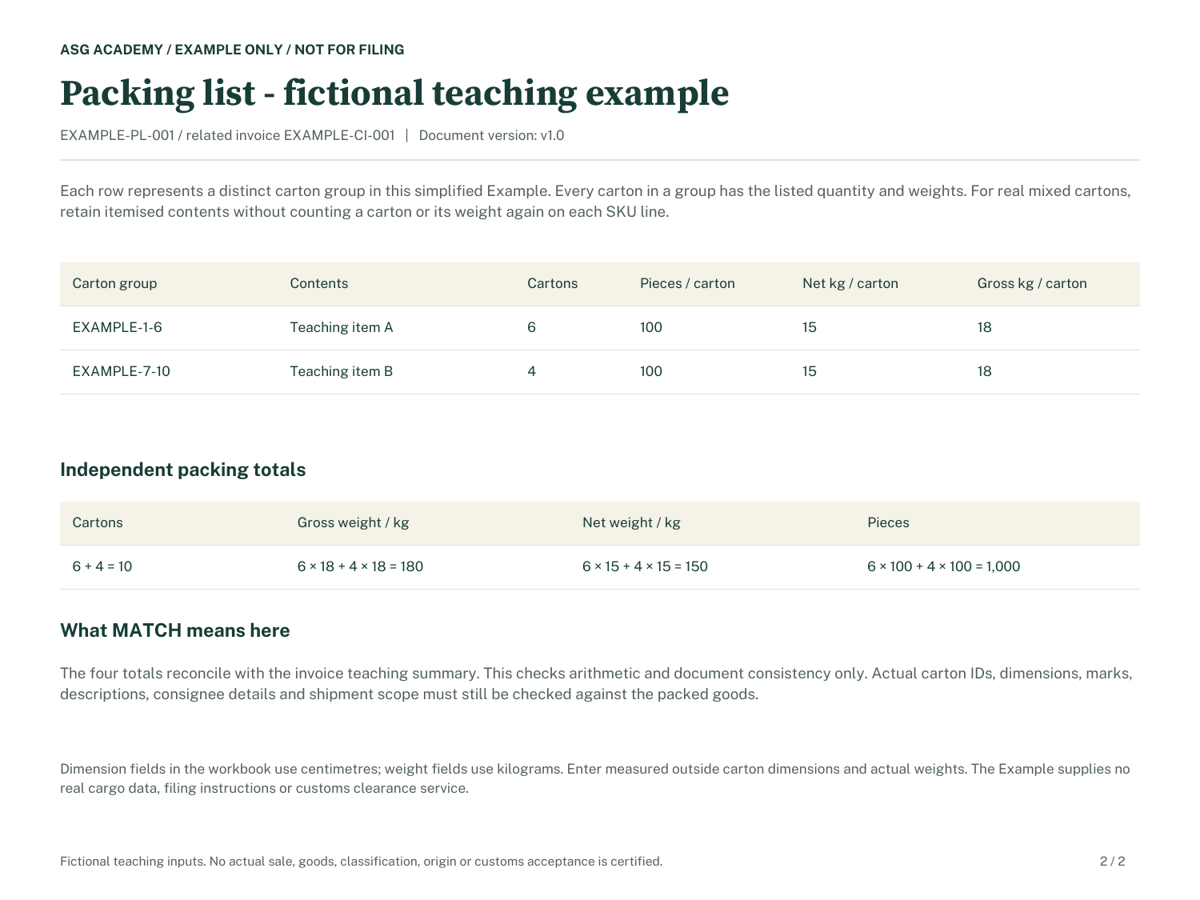
The fictional example uses EXAMPLE-CI-001 and EXAMPLE-PL-001. Goods A is 600 pieces at USD 3.00, and goods B is 400 pieces at USD 5.50, for a goods total of USD 4,000. The packing list has six cartons and four cartons, each with 100 pieces, 15 kg net and 18 kg gross. So both papers show ten cartons, 1,000 pieces, 150 kg net and 180 kg gross. HTS, origin and trade terms are left as teaching fields. Do not file this example.

The document errors we catch most before shipping are piece counts that drift, gross and net weights swapped, and descriptions that do not match the goods. At ASG, the last of our four QC stages is Pre-Dispatch, where we check packing, labels and addresses before the goods leave. We check the papers in five passes: pieces and carton groups; weight units and gross above net; each description against the goods; the HTS code with your broker from the product facts; and amounts, currency and value questions with your broker. Keep each fix with its document revision.
ASG’s published Pre-Dispatch workflow →
Use the full legal names and addresses. Give the invoice a number and date, link it to the signed PO, and keep the source records.
Link each line to the real product, spec and SKU. Give your broker enough detail to classify it, then record the agreed HTS code and its source.
Use one unit and one currency on every line. Check that the goods total matches the sale. Flag any charges or discounts for your broker.
Write the trade term with its edition and named place. Record the real country of origin; the port of loading does not decide it.
Build the packing list from the real cartons, apart from the invoice. Clear every MISSING or MISMATCH, then send the final set to your broker.
Start from the real sale, the confirmed buyer and seller, and the product records. Add the invoice and order numbers, descriptions, HTS codes, quantities, prices, currency, origin and trade term. Build the packing list on its own, then compare the totals. Ask your customs broker to review it before the goods ship.
A commercial invoice puts the seller, buyer and document numbers at the top. The goods lines sit in the middle: description, HTS code, origin, quantity, unit price and amount. Totals, currency and the trade term go at the bottom. This template keeps carton data on a separate packing list sheet, so the two can be cross-checked.
A commercial invoice should include the buyer and seller, the invoice number and date, a clear description of each item, quantity and unit, unit price, line total, currency, trade term and country of origin. Many importers also add the HTS code to help the broker; 19 CFR 141.86 lists the required fields.
Not quite. People often say shipping invoice when they mean the commercial invoice that goes with the goods. A freight invoice from a carrier, which bills for transport, is a different document. A pro forma invoice is a quote issued before payment, and it does not replace the commercial invoice for customs. commercial invoice vs pro forma invoice
The free commercial invoice and packing list template is one Excel workbook with an invoice sheet and a packing list sheet, joined by four total checks. A filled example PDF is in the example section above. The full template pack comes with the course, The China Side Playbook, open to the waitlist first.